
Click to see more details:
The Living World Streaming System is a custom Unreal Engine subsystem that extends World Partition with state-aware, performance-oriented streaming of gameplay actors, designed specifically for large-scale open-world simulation.
It introduces:
- A WorldSubsystem (
ULivingWorldStreamingSubsystem) that tracks World Partition runtime cell transitions - A UInterface that needs to be implemented in the user side in order to get the AActor recognised by the System. This implementation can either be in the root AActor or any of its attached Components. This way, the system can manage GUID identity, tick budget, and LOD behavior per actor.
- Custom project settings
- Targeted hooks inside World Partition internals to integrate at the correct execution points
The core goal is to make World Partition capable of restoring and persisting gameplay state (animation, AI, transforms, etc.) across cell unload/load cycles, while also applying distance-based simulation optimizations.
UINTERFACE(Blueprintable)
class LIVINGWORLDSTREAMING_API USnapshotInterface : public UInterface
{
	GENERATED_BODY()
};

class ISnapshotInterface
{
	GENERATED_BODY()

public:

	virtual void BuildSnapshot(TArray<uint8>& OutBytes) const = 0;
	virtual void ApplySnapshot(const TArray<uint8>& InBytes) = 0;
	virtual const FGuid& GetPersistentGuid() const = 0;
};
Concept & Motivation
In a default Unreal Engine setup, once a cell is unloaded by World Partition:
- Actors inside it are destroyed
- Their runtime state (AI, animation, behavior, transform, tasks, schedule…) is lost
This is acceptable for static props, but not for dynamic open-world agents such as NPCs.
The Living World Streaming System solves that gap by introducing:
- Snapshot-based state persistence
- Per-actor simulation LODs
- Dynamic tick-rate scaling based on player proximity
- Predictable restore logic when a cell becomes active again
This combination creates a foundation for “living world” behaviors that survive world streaming.
Subsystem Architecture
ULivingWorldStreamingSubsystem (UWorldSubsystem)
The subsystem initializes when the game world starts and registers into:
GOnWorldPartitionUpdated.AddUObject(this, &ULivingWorldStreamingSubsystem::Work);
This hooks directly in WorldPartition pipeline, providing direct visibility into when runtime cells are activated or deactivated.
It maintains three core maps:
TMap<FGuid, TArray<ActorSnapshotCopy>> m_snapshotsSavedForLaterRecovery;
TMap<FGuid, TObjectPtr<const UWorldPartitionRuntimeCell>> m_snapshotWorldPartitionActiveCells;
TMap<FGuid, TArray<ActorSnapshotCopy>> m_snapshotWorldPartitionActiveCellsSlow;
These allow the subsystem to detect per-cell diffs between world partition updates and determine exactly:
- Which cells were deactivated (→ save snapshots)
- Which cells were activated (→ restore snapshots)
- Which cells remain active (→ update tick budgets / LODs)
Actor Snapshot System
ActorSnapshotCopy struct
For each tracked actor, the system stores a lightweight snapshot:
struct ActorSnapshotCopy
{
	TArray<uint8> snapshotBytes;
	FGuid persistentGuid;

	bool operator==(const ActorSnapshotCopy& other) const
	{
		return persistentGuid == other.persistentGuid;
	}
};
The struct is intentionally designed to be extensible. The snapshot bytes are filled in the user side. I have implemented an example of its usage:
USTRUCT()
struct FSnapshotData //this is an example; this should be in the users code and they decide what to serialize to bytes
{
	GENERATED_BODY()

	UPROPERTY()
	FTransform parentTransform;

	UPROPERTY()
	TMap<FString, FTransform> childTransforms;

        //add here necessary state: AI target, ragdoll state, whatever

	friend FArchive& operator<<(FArchive& Ar, FSnapshotData& Data)
	{
		Ar << Data.parentTransform;
		Ar << Data.childTransforms;
		return Ar;
	}
};

UCLASS(ClassGroup = (LivingWorld), meta = (BlueprintSpawnableComponent))
class LIVINGWORLDSTREAMING_API ULivingWorldStreamingSimComponent final : public UActorComponent, public ISnapshotInterface
{
        GENERATED_BODY()

public:

	ULivingWorldStreamingSimComponent();
	void SetObjectLOD(EActorLod newLod);

	virtual void OnRegister() override;
	virtual void BuildSnapshot(TArray<uint8>& OutBytes) const override;
	virtual void ApplySnapshot(const TArray<uint8>& InBytes) override;
	virtual const FGuid& GetPersistentGuid() const override;

	UPROPERTY()
	FGuid m_persistentGuid;
};
Additional fields—such as animation state, behavior tree task identifiers, AI movement modes, or gameplay tags—can be added without redesigning the system.
This allows future expansion into:
- Full offline AI simulation
- Persistent animation state
- Interruptible behaviors
- Living city task systems
- Smart object interactions
Streaming Pipeline
1. First Invocation
On the subsystem’s first call to Work, it records the initial slow snapshot of actors in currently active cells.
2. Subsequent Streaming Cycles
A) Build current active cell map
m_snapshotWorldPartitionActiveCells.Add(cellGuid, pCell)
B) Detect deactivated cells
Cells present in the slow snapshot but missing in the current snapshot represent:
- Cells that were streamed out
- Their actor states are added to
m_snapshotsSavedForLaterRecovery
C) Detect newly activated cells
For every newly active cell:
- If a saved snapshot exists and if the actor
implements the interface,we get the persistent GUID - The snapshot is restored
Example:
pSnapshotInterface->ApplySnapshot(savedActorSnapshot.snapshotBytes);Animation/AI-related state (among others) could be reapplied here as well if added to the snapshot struct.
D) Promote current snapshot to slow snapshot
This enables fast diffing on the next cycle.
Simulation Component & Tick-Rate Optimization
ULivingWorldStreamingSimComponent
Every participating actor owns a simulation component that provides:
- A stable persistent GUID used as a key for snapshot persistence
- Hooks for applying restored transforms and state
- A distance-based tick-rate controller
The tick budgeting logic evaluates player proximity and adjusts the actor’s update frequency:
- Close → Full tick (AI, animation, decision making)
- Mid-range → Reduced tick frequency (light simulation)
- Far → Very low tick rate or complete suspension (offline sim / frozen state)
By controlling tick rate at the component level, the system reduces CPU load in dense areas while maintaining local believability.
This is a foundational optimization strategy in open-world engines.
World Partition Integration
The subsystem interacts with the internal World Partition pipeline via:
UWorldPartitionUWorldPartitionRuntimeCellUWorldPartitionLevelStreamingPolicy
Custom hooks let the system react at the correct point in the cell loading lifecycle—after the Level is initialized, before gameplay logic runs—ensuring complete control over:
- When snapshots are taken
- When state restoration occurs
- How components transition between simulation LODs
This minimizes engine modifications while enabling advanced open-world behavior.
Technical Benefits
- State persistence across streaming boundaries (critical for NPCs and active gameplay agents)
- Extensible snapshot architecture (AI, animation, behavior, smart objects, schedules…)
- Distance-based tick-rate scaling for performance optimization
- Deterministic actor restoration using GUID identity
- Support for thousands of streamed actors distributed across World Partition cells
- Foundation for offline simulation and AI LOD systems
Summary
The Living World Streaming System augments Unreal Engine’s World Partition with a robust, extensible framework for persistent actor state, simulation scalability, and open-world consistency.
It lays the technical groundwork for living-city systems, complex AI behaviors, and scalable world streaming—while ensuring performance budgets remain stable through distance-based tick management and per-cell snapshot logic.
Link to FAB: https://www.fab.com/listings/89a73edf-cf06-4ce7-b1cb-4a9eaf667198
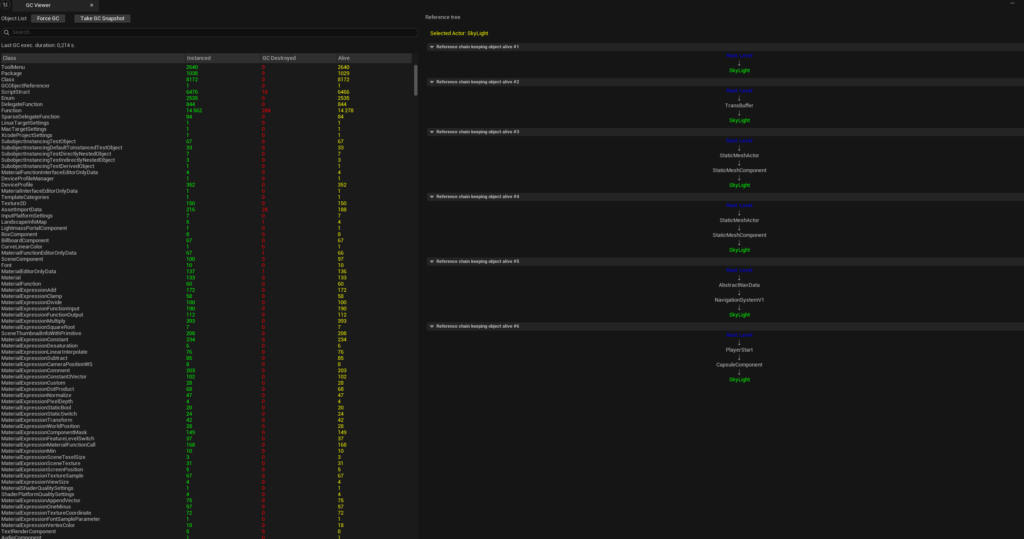
This is an Unreal Engine Editor plugin called Garbage Collector Viewer (GC Viewer).
It hooks into Unreal’s core object lifecycle by listening to custom events tied to the GC and the GUObjectArray. From the moment the editor session starts, the plugin tracks per-class statistics in real time:
- Instanced: how many objects of a given class have been created.
- GC Destroyed: how many were actually reclaimed by Unreal’s garbage collector.
- Alive: how many are still alive at the current moment.
This makes it easy to detect memory and lifetime issues early. For example, if a class shows a very high number of instantiated objects but very few GC destructions, it strongly suggests that something is unexpectedly holding references and preventing those objects from being collected.
On top of the global stats, GC Viewer also provides:
- Contextual debugging: When an actor or object is selected in the level, the plugin can display its reference chains, including Outer relationships, showing the full paths from GC roots down to the selected object. This makes it clear why the object is still alive and which ownership or reference relationships are anchoring it in memory.
- Snapshot functionality: the user can take snapshots of the GC and GUObjectArray that are saved in CSV format so they can be compared easily.
- Force GC
I am still working on it, so more features will be added!